blenderfly Documentation
blenderfly — a Blender 4.5–5.0+ addon that lets you fly the camera with a gamepad, like a drone. Left stick moves, right stick looks around, triggers and buttons control zoom, roll, and timeline.
- Author: jordanfx
- Version: 1.0.0
- Panel: View3D → Sidebar (N) → blenderfly tab
What blenderfly Does
- Cinematic Mode — Gamepad control: move, pan, tilt, roll, zoom. Smooth camera with acceleration and inertia.
- FPV Mode — RC transmitter control: physics-based flight (thrust, gravity, drag). Controls similar to LiftOff and FPV Logic and other sims. See FPV Mode.
- Camera flight — Move forward/back, left/right, up/down
- Camera rotation — Pan (left-right), tilt (up-down), roll
- Zoom (FOV) — Change the camera's field of view
- Timeline recording — Record keyframes while flying during playback
- Presets — Save and load different "feel" configurations
Controller Mapping
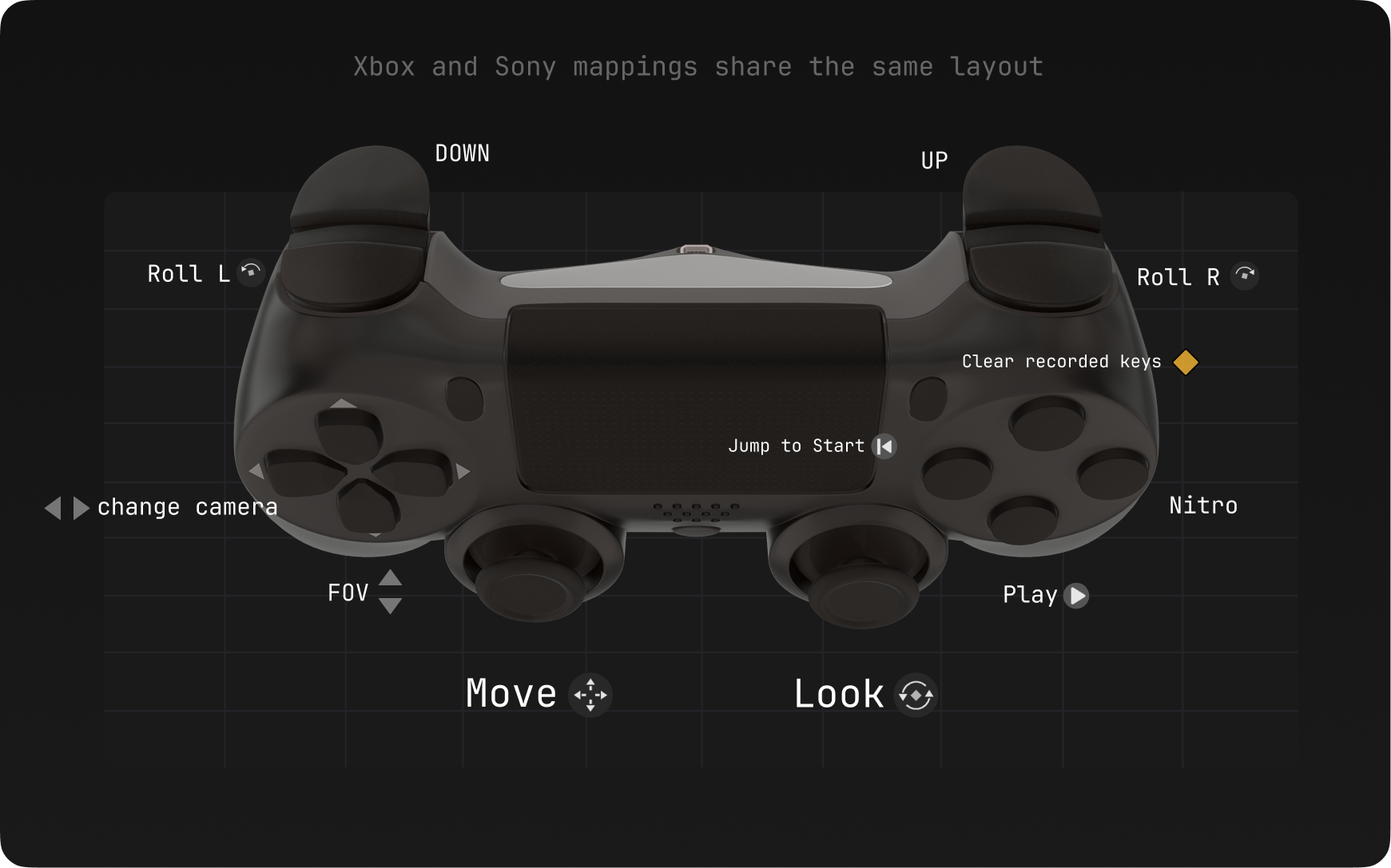
Supported Controllers
| Platform | Controllers |
|---|---|
| Windows | Xbox (XInput), Sony DS4/DS5; RC USB joystick (FPV mode only) |
| macOS | Xbox, Sony DS4/DS5 (HID) |
RC transmitters (USB joystick)
These show up as a normal USB game controller / HID joystick — use FPV mode in the addon.
EdgeTX / OpenTX — e.g. RadioMaster TX16S, Boxer, Zorro, Jumper T-Pro, and similar handsets (USB joystick / trainer mode per your radio’s manual).
FrSky Taranis — when Windows lists STMicroelectronics Joystick in FS Mode, it works the same way.
Full details: Compatibility.
Getting Started
- Installation — Install and enable the addon
- Quick Start — First flight in minutes
- FPV Mode — RC transmitter flight (physics-based)
- Movement & Look — How sticks and axes work
- Tuning — Speed, curves, smoothness
Documentation Sections
- Getting Started — Installation and first run
- Features — Overview, FPV Mode, movement, presets, recording
- Tuning — Feel settings, Auto-Horizon, FOV
- Reference — Button mapping, Input Monitor
- Compatibility — Blender and OS support